
Live Feed
The Live Feed is a real-time sidebar panel that displays log messages and variable dumps as they happen in your application. It listens to Server-Sent Events (SSE) from the backend and shows them instantly without requiring a page refresh.
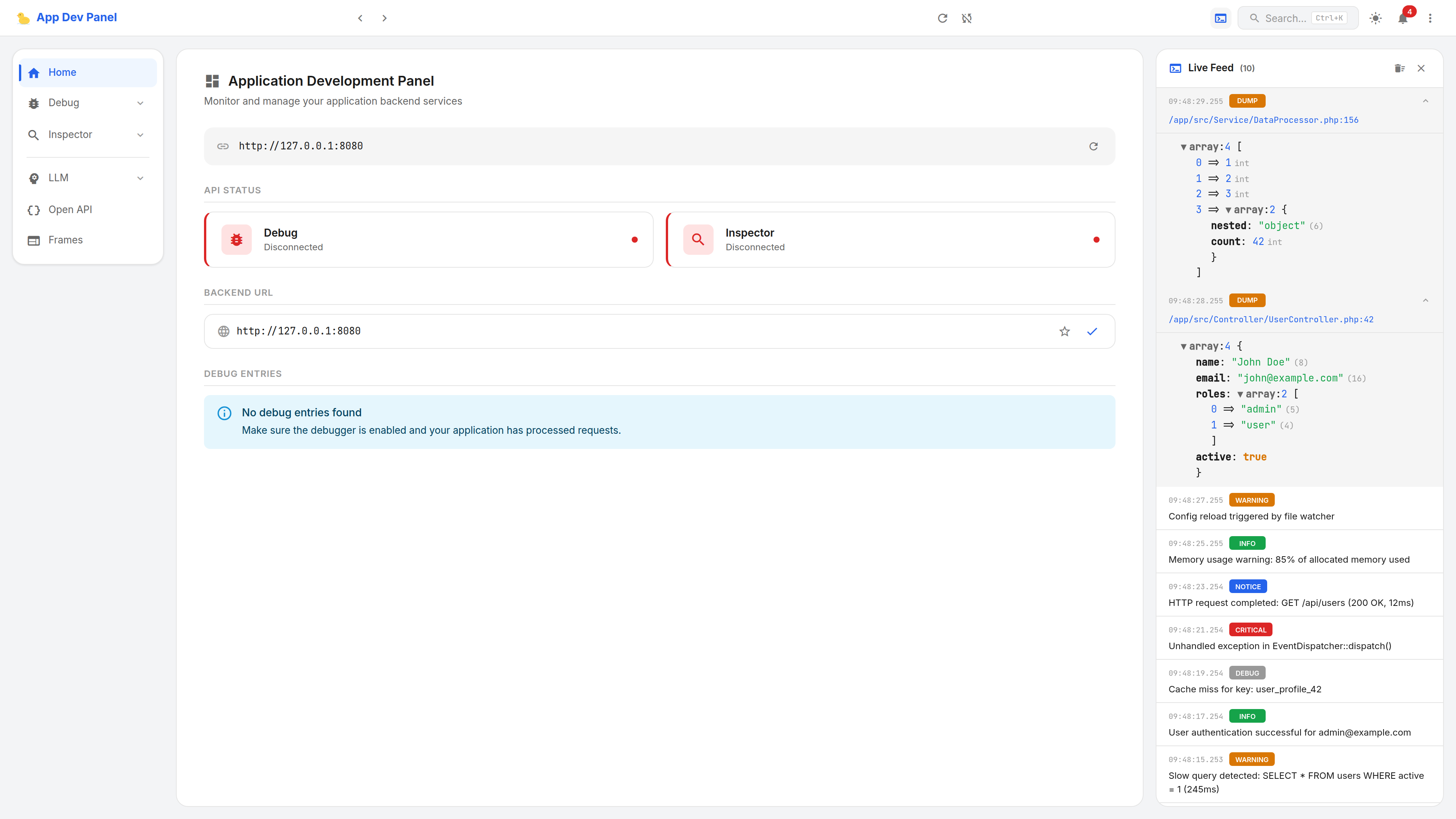
Opening the Live Feed
Click the terminal icon in the top bar to open the Live Feed drawer from the right side of the screen. A badge on the icon shows the count of unread events.
The drawer can be closed by clicking the X button or clicking outside of it.
Event Types
The Live Feed displays two types of real-time events:
Log Events
Log messages are broadcast via the LoggerDecorator proxy whenever your application logs a message through PSR-3 Logger. Each log entry shows:
- Timestamp — when the log was received
- Level chip — color-coded severity (ERROR = red, WARNING = yellow, INFO = green, DEBUG = grey, CRITICAL = dark red, NOTICE = blue)
- Message — the log message text
- Context — expandable JSON tree with log context data (click to expand)
Dump Events
Variable dumps are broadcast via the VarDumperHandler whenever your application dumps a variable. Each dump entry shows:
- Timestamp — when the dump was received
- DUMP chip — in warning/orange color
- Source line — clickable file path link (opens in your configured editor)
- Variable tree — expandable variable inspection with type annotations
How It Works
The panel always connects to /debug/api/event-stream and listens for:
| SSE Event Type | Source | Description |
|---|---|---|
live-log | LoggerDecorator | PSR-3 log message with level, message, and context |
live-dump | VarDumperHandler | Variable dump with value and source file location |
Events are stored in memory (up to 500 entries) and displayed in reverse chronological order (newest first).
Generating Test Events
Use the CLI broadcast command to send test events:
# From your application directory
php yii dev:broadcast -m "Test log message"This sends both a log message and a variable dump to all connected SSE listeners.
Clearing Events
Click the trash icon in the drawer header to clear all accumulated events. The unread counter on the top bar icon resets automatically when you open the drawer.
Requirements
- The sockets PHP extension must be installed for live event streaming
- Your application must use the
LoggerDecoratorand/orVarDumperHandlerproxies (automatically configured by adapters)