
Commands
Run application commands directly from the debug panel — tests, static analysis, and composer scripts.
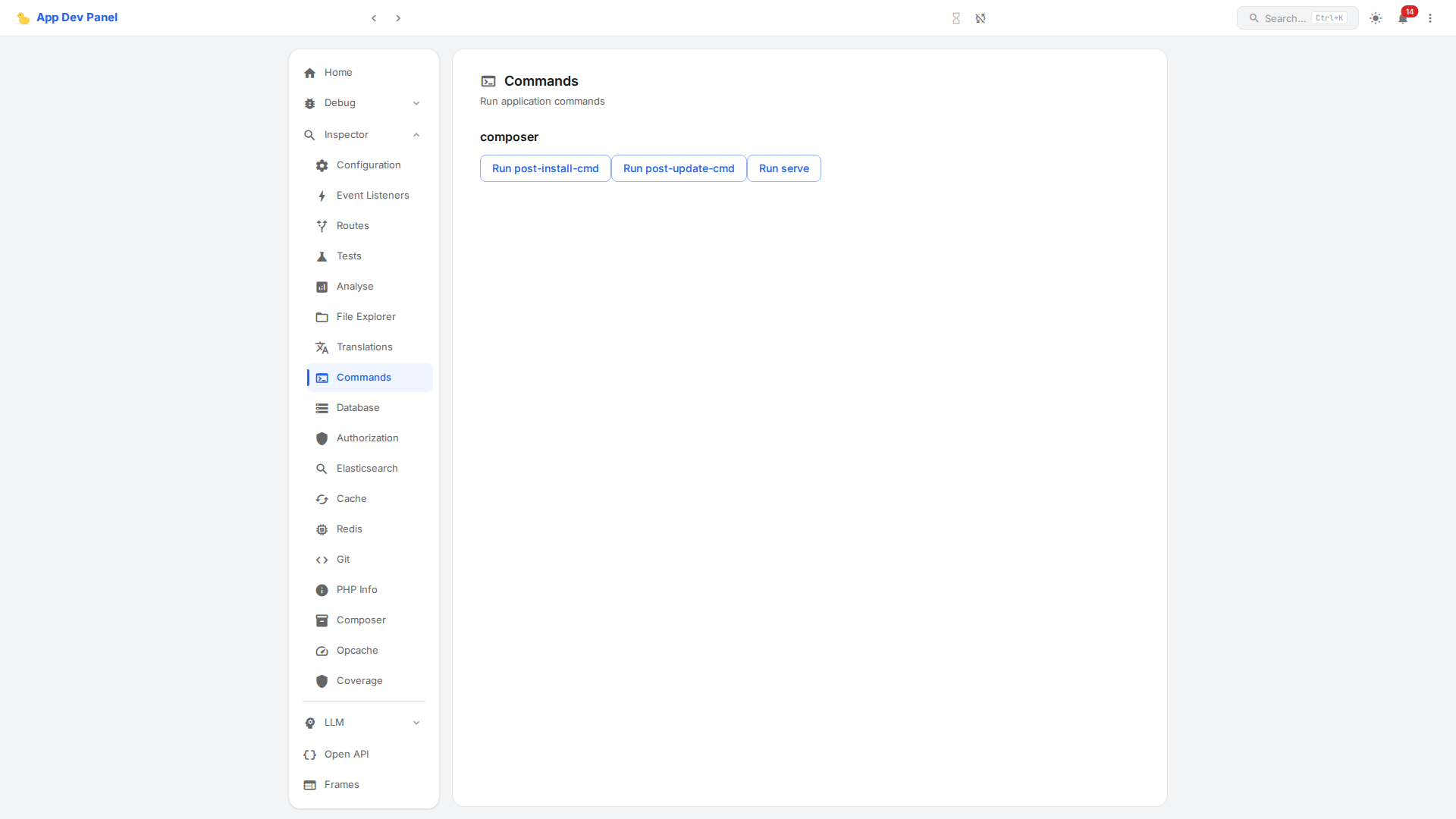
Built-in Commands
Built-in commands are auto-discovered. If the tool is installed, the command appears automatically — no configuration needed.
Static Analysis
| Command | Tool | Auto-detection |
|---|---|---|
analyse/psalm | Psalm | vimeo/psalm in Composer |
analyse/phpstan | PHPStan | phpstan/phpstan in Composer |
analyse/mago | Mago | carthage-software/mago in Composer or mago binary in PATH |
Testing
| Command | Tool | Auto-detection |
|---|---|---|
test/phpunit | PHPUnit | phpunit/phpunit in Composer |
test/codeception | Codeception | codeception/codeception in Composer |
test/pest | Pest | pestphp/pest in Composer |
test/testo | Testo | testo/testo in Composer |
Other
| Command | Source | Description |
|---|---|---|
composer/* | composer.json | All scripts entries are auto-discovered as composer/{scriptName} |
How It Works
Commands are discovered from three sources:
- Built-in commands — All analyse and test commands from the table above. Each command has an
isAvailable()check; unavailable commands are hidden automatically. - Custom commands — Additional commands registered via adapter config (
commandMap). - Composer scripts — All
scriptsentries fromcomposer.jsonare exposed ascomposer/{scriptName}commands.
Click a command button to execute it. Output is displayed in a dialog with status indication.
Creating Custom Commands
Implement CommandInterface to create a custom command:
<?php

declare(strict_types=1);

namespace App\Debug\Command;

use AppDevPanel\Api\Inspector\CommandInterface;
use AppDevPanel\Api\Inspector\CommandResponse;
use AppDevPanel\Api\PathResolverInterface;
use Symfony\Component\Process\Process;

class MyLinterCommand implements CommandInterface
{
    public const COMMAND_NAME = 'analyse/my-linter';

    public function __construct(
        private readonly PathResolverInterface $pathResolver,
    ) {}

    public static function isAvailable(): bool
    {
        return \Composer\InstalledVersions::isInstalled('vendor/my-linter');
    }

    public static function getTitle(): string
    {
        return 'My Linter';
    }

    public static function getDescription(): string
    {
        return 'Run custom linter on the project';
    }

    public function run(): CommandResponse
    {
        $process = new Process(['vendor/bin/my-linter', 'check']);
        $process->setWorkingDirectory($this->pathResolver->getRootPath())
            ->setTimeout(null)
            ->run();

        $output = rtrim($process->getOutput());

        if ($process->getExitCode() > 1) {
            return new CommandResponse(
                status: CommandResponse::STATUS_FAIL,
                result: null,
                errors: array_filter([$output, $process->getErrorOutput()]),
            );
        }

        return new CommandResponse(
            status: $process->isSuccessful()
                ? CommandResponse::STATUS_OK
                : CommandResponse::STATUS_ERROR,
            result: $output,
        );
    }
}CommandInterface
interface CommandInterface
{
    public static function isAvailable(): bool; // Return false to hide the command
    public static function getTitle(): string;  // Display name in the panel
    public static function getDescription(): string;
    public function run(): CommandResponse;
}CommandResponse
| Status | Meaning |
|---|---|
ok | Command succeeded |
error | Command ran but reported issues (e.g., lint errors found) |
fail | Command could not run (e.g., binary not found, crash) |
Registering Custom Commands
Custom commands are registered via the commandMap parameter. Built-in commands are always included — commandMap only adds extras.
Yii 3
In your application params (config/params.php):
return [
    'app-dev-panel/yii3' => [
        'api' => [
            'commandMap' => [
                'analyse' => [
                    'analyse/my-linter' => \App\Debug\Command\MyLinterCommand::class,
                ],
            ],
        ],
    ],
];Register dependencies in your DI config if the command needs constructor injection:
\App\Debug\Command\MyLinterCommand::class => static fn(
    \AppDevPanel\Api\PathResolverInterface $pathResolver,
) => new \App\Debug\Command\MyLinterCommand($pathResolver),Symfony
In your config/packages/app_dev_panel.yaml:
services:
    App\Debug\Command\MyLinterCommand:
        arguments:
- '@AppDevPanel\Api\PathResolverInterface'Override CommandController to pass the commandMap:
services:
    AppDevPanel\Api\Inspector\Controller\CommandController:
        arguments:
            $commandMap:
                analyse:
analyse/my-linter: App\Debug\Command\MyLinterCommandLaravel
In a service provider:
use AppDevPanel\Api\Inspector\Controller\CommandController;
use AppDevPanel\Api\PathResolverInterface;

$this->app->singleton(MyLinterCommand::class, fn() => new MyLinterCommand(
    $this->app->make(PathResolverInterface::class),
));

$this->app->extend(CommandController::class, function (CommandController $controller) {
    // Built-in commands are already included.
    // Use the commandMap constructor parameter for custom commands.
    return new CommandController(
        $this->app->make(\AppDevPanel\Api\Http\JsonResponseFactoryInterface::class),
        $this->app->make(PathResolverInterface::class),
        $this->app,
        [
            'analyse' => [
                'analyse/my-linter' => MyLinterCommand::class,
            ],
        ],
    );
});Yii 2
In your application config (config/web.php):
'modules' => [
    'debug' => [
        'class' => \AppDevPanel\Adapter\Yii2\Module::class,
        'commandMap' => [
            'analyse' => [
                'analyse/my-linter' => \App\Debug\Command\MyLinterCommand::class,
            ],
        ],
    ],
],API Endpoints
| Method | Path | Description |
|---|---|---|
| GET | /inspect/api/command | List available commands |
| POST | /inspect/api/command?command=analyse/psalm | Execute a command |
Response format:
{
    "status": "ok",
    "result": "...",
    "error": []
}TIP
PHPUnit and Codeception commands use custom JSON reporters for structured output in the panel. Other commands return plain text output.