
Request Collector
Captures incoming HTTP request and response details — method, path, headers, query parameters, status code, and raw bodies.
What It Captures
| Field | Description |
|---|---|
requestUrl | Full request URL |
requestPath | URL path |
requestQuery | Query string |
requestMethod | HTTP method (GET, POST, etc.) |
requestIsAjax | Whether it's an AJAX/XHR request |
userIp | Client IP address |
responseStatusCode | Response HTTP status code |
request | Full PSR-7 ServerRequest object |
requestRaw | Raw HTTP request |
response | Full PSR-7 Response object |
responseRaw | Raw HTTP response |
Data Schema
{
    "requestUrl": "http://app.local/users?page=2",
    "requestPath": "/users",
    "requestQuery": "page=2",
    "requestMethod": "GET",
    "requestIsAjax": false,
    "userIp": "127.0.0.1",
    "responseStatusCode": 200,
    "requestRaw": "GET /users?page=2 HTTP/1.1\r\nHost: app.local\r\n\r\n",
    "responseRaw": "HTTP/1.1 200 OK\r\nContent-Type: text/html\r\n\r\n..."
}Summary (shown in debug entry list):
{
    "request": {
        "url": "http://app.local/users?page=2",
        "path": "/users",
        "query": "page=2",
        "method": "GET",
        "isAjax": false,
        "userIp": "127.0.0.1"
    },
    "response": {
        "statusCode": 200
    }
}Contract
use AppDevPanel\Kernel\Collector\Web\RequestCollector;

$collector->collectRequest(request: $serverRequest);
$collector->collectResponse(response: $response);INFO
RequestCollectorAppDevPanel\Kernel\Collector\Web\RequestCollectorCollects Request data during application lifecycle. implements SummaryCollectorInterfaceAppDevPanel\Kernel\Collector\SummaryCollectorInterfaceSummary data collector responsibility is to collect summary data for a collector. Summary is used to display a list of previous requests and select one to display full info. Its data set is specific to the list and is reduced compared to full data collected in {@see CollectorInterface}. and depends on TimelineCollectorAppDevPanel\Kernel\Collector\TimelineCollectorCollects Timeline data during application lifecycle.. Located in the Web sub-namespace.
How It Works
Framework adapters collect the PSR-7 request at the beginning of the middleware pipeline and the response at the end. The collector stores both the parsed objects and raw HTTP representations.
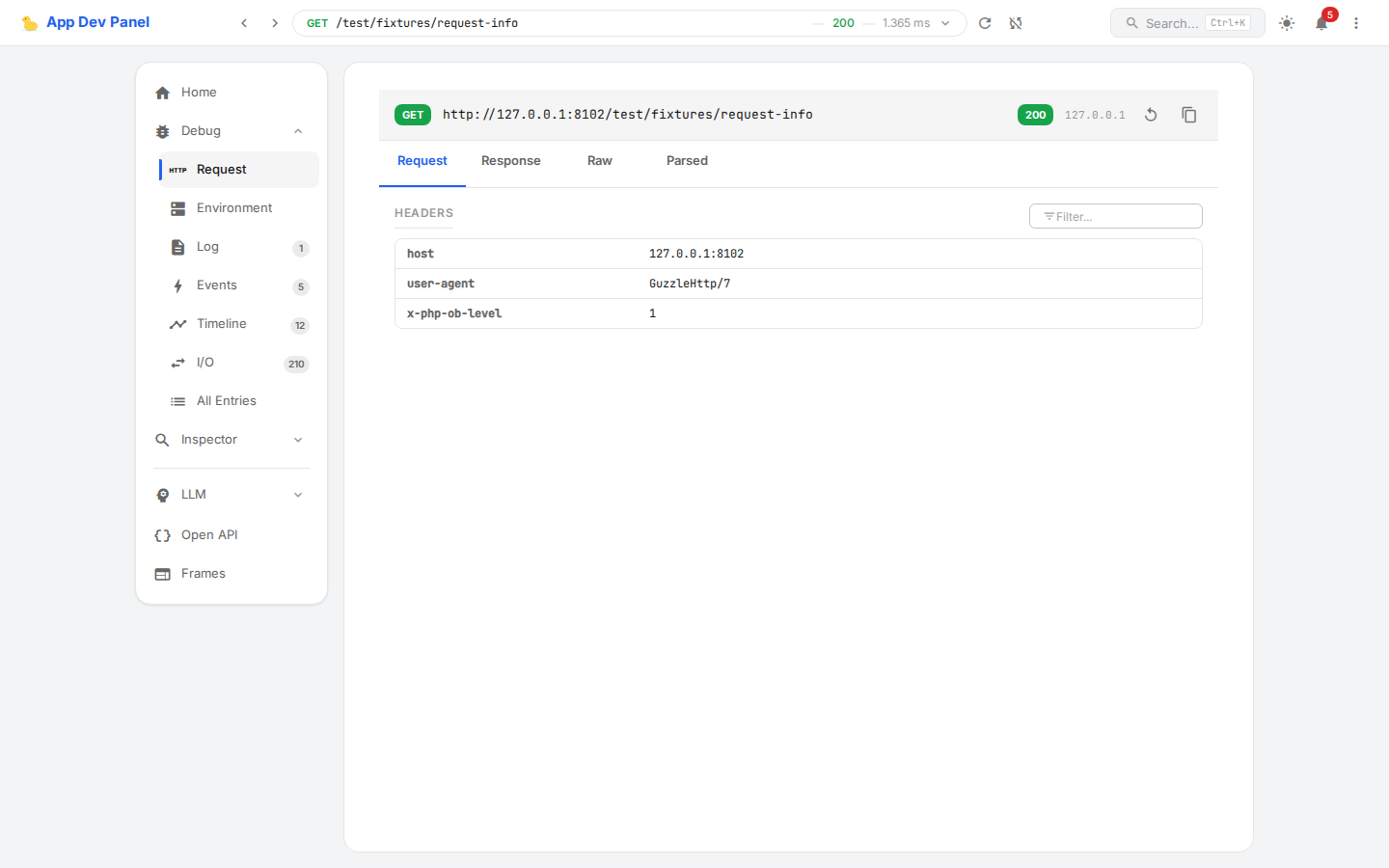
Debug Panel
- Request/Response tabs — switch between request and response views
- Headers table — filterable header key-value pairs
- Raw view — full HTTP request/response as raw text
- Parsed view — structured view of query params, body, cookies
- Status badge — color-coded response status (2xx green, 4xx orange, 5xx red)
- Repeat request — button to re-send the same request
- Copy cURL — copy the request as a cURL command